
The Steward’s Tech Stack: Aligning Innovation with Eternal Purpose
In the world of Christian leadership, we often speak of “stewardship” in the context of capital campaigns, building projects, or endowment management. Yet, in 2026, one of our most significant areas of stewardship is digital. The technology stack of a Christian school—the software our teachers use to record grades, the hardware our students use for research, and the security systems that protect our community—is more than just a set of tools. It is a reflection of our Institutional Viability and our commitment to Academic Distinction.
At Regents, we have moved beyond the question of if we should use technology to a more disciplined question: How does this tool serve the “Coram Deo” life of our students? If we are called to equip students to know, love, and practice that which is true, good, and beautiful, then our technology must do more than just provide convenience. It must facilitate flourishing.
1. Mission and Philosophy: The “Shiny Object” Test
The greatest threat to a school’s budget isn’t a lack of funds; it’s the “shiny object.” Every year, the EdTech market produces thousands of new platforms promising to revolutionize the classroom. For a Head of School, these promises can be intoxicating. But as leaders within the Council on Educational Standards and Accountability (CESA), we know that true accountability begins with mission alignment.
When a teacher or department head brings a new tech request to the table, our first step isn’t to look at the price tag. It is to sit down and ask: “What specific problem are we trying to solve?”
The Vetting Philosophy
We begin with an internal audit. We ask if we already have a solution in place that meets the need. If we do, we perform a rigorous comparative analysis: Can this new tool do it better? Is it cheaper in the long run? Is it more secure? What are the privacy implications of this tool?
If the problem is unique and no existing tool fits, we take a “deeper look.” At Regents, this means evaluating technology through our pedagogical philosophy. We ask:
- Does this tool encourage the pursuit of truth, or does it merely aggregate information?
- Does it promote the process of learning, or does it offer shortcuts that bypass the struggle necessary for growth?
- How does this impact our ability to teach from a Christian worldview?
2. Process and Partnership: Leading Together
Technology should never be a siloed department that makes decisions in isolation. At Regents, “Technology” rarely makes a decision on its own unless it is a purely infrastructure-related IT project. For everything else, we follow a model of collaborative stewardship.
Healthy Decision-Making
When we evaluate a major platform—like a Student Information System (SIS) or a Financial System—we don’t just look at the technical specs. We bring leadership, administrators, and teachers into the room.
One of the most practical ways we’ve found to honor our faculty during this process is by arranging substitutes for the days they are helping with the evaluation. We know that asking a teacher to evaluate a complex piece of software during their planning period results in shallow feedback and high stress. By giving them a full day to dive into the platform, we get high-quality data and, more importantly, we get teacher buy-in. It is a longer process, but the result is a community that is “much happier” because they were an integral part of the decision.
We also recognize that not all technology is created equal. A “one-size-fits-all” replacement cycle is poor stewardship. Instead, we use variable lifecycles:
Variable Lifecycles
- Large-Scale Systems (SIS/Finance): These are 10-year investments. They require stability and deep integration.
- Smaller Software Systems: We review these every 3–5 years to ensure they are still the best in class.
- Hardware (Laptops/Devices): While the industry standard is a 3-year replacement, we have found that for our specific use at Regents, we can get 5 years of effective use without sacrificing quality. That extra 40% of “life” per device represents thousands of dollars that can be redirected toward mission-critical needs.
3. Budgeting for the Horizon: The 10-Year Cycle
We are perhaps an outlier in our approach to budgeting, but we believe it is the only way to ensure long-term institutional viability. We forecast our IT budget on a 10-year cycle.
While the numbers ten years out are necessarily “hazy,” this practice allows us to understand the “Total Cost of Ownership” (TCO) for every project. We don’t just look at the first-year price; we look at:
- Hard Costs: Licenses, hardware, and mandatory upgrades.
- Soft Costs: Professional development, internal support time, and the impact on our infrastructure.
This long-range view allows us to say “no” to good things when the long-term impact isn’t sustainable. It also helps us navigate vendor price hikes. By maintaining a strong network of peers, we often hear about coming price changes before they hit our inbox, allowing us to be proactive rather than reactive. If a vendor becomes unviable, we have the time to find a partner who offers a similar service at a more reasonable price.
4. Implementation: The “One Major Change” Rule
Once a tool is approved, the real work begins: Change Management. Change is rarely “fun,” but it doesn’t have to be painful. At Regents, we follow the “One Major Change” rule. We do our best to limit the school to only one significant technology shift per year to protect our teachers from “innovation burnout.”
Supporting the Rollout
- Communicate Early and Often: We start talking about changes well in advance so that the “why” is understood before the “how” is taught.
- Champion-Led Training: We find “product champions” within the faculty to help roll out systems. Peer-to-peer support is always more effective than IT-to-teacher support.
- Gamification: We use contests, games, and even gift cards to make training more engaging.
- The Help Site: We maintain a dedicated website with “tech aids” so that teachers have support at their fingertips 24/7.
5. Pruning and Evaluation: The Courage to Cut
A healthy tech stack requires regular pruning. Every year (or every three years, depending on the tool), we ask: “Is the pricing in line with the value we are getting?”
We look closely at user counts and depth of use. Sometimes a tool is only used by a few teachers, but those teachers use it so deeply that it has a massive impact on student learning. We don’t use hard metrics alone; we rely on conversations with department heads and teachers. Technology is a relational endeavor, and the best “data” often comes from a teacher explaining how a specific tool helped a student finally “get” a difficult concept.
The Regents Technology Vetting Rubric
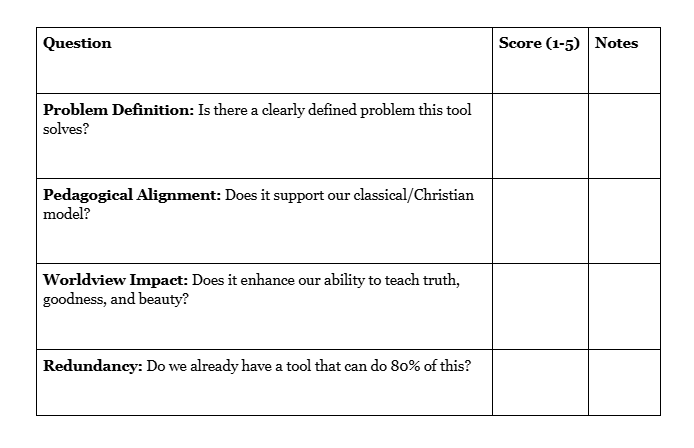
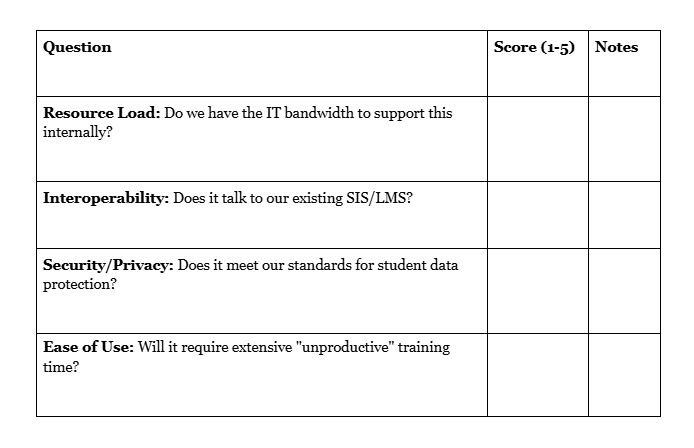
To help your team move from “shiny objects” to “mission-aligned tools,” use this rubric for your next technology request.
Section I: Mission & Pedagogy (The “Why”)
Section II: Technical & Operational (The “How”)
Section III: Financial Stewardship (The “Cost”)
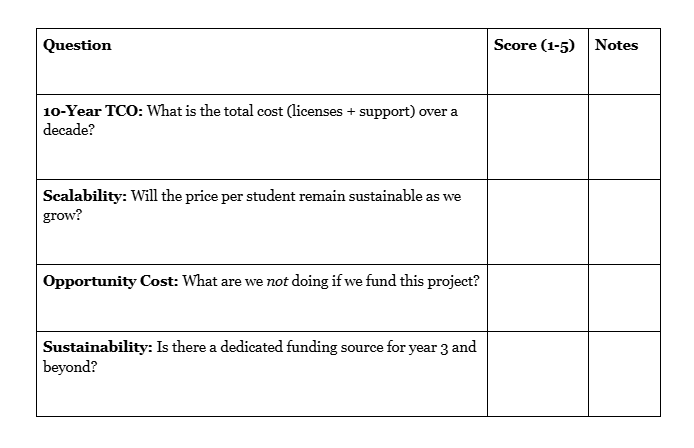
Final Recommendation:
- 0-30: Reject. The tool is likely a “shiny object” or creates too much “drag.”
- 31-45: Re-evaluate. Potentially useful, but may need a smaller pilot first.
- 46-60: Approve. The tool is mission-aligned and financially sustainable.
Moving Forward
Accountability in technology is not about saying “no” to progress; it is about saying “yes” to the things that truly matter. By adopting a long-term view and involving our faculty in the process, we ensure that our digital tools serve the eternal mission of our schools.

Lee Jones
Chief Financial Officer, Regents School of Austin
Lee Jones serves as the Chief Financial Officer at Regents. Since joining Regents in 2011, Lee has worked to develop and implement a strategic financial planning model as part of the school’s overall operational plan. She leads the school’s finance and human resources operations, working closely with senior leadership to ensure the finance function effectively supports mission-driven programming and that tuition and contribution dollars are stewarded well.
Before joining Regents, Lee’s professional experience includes managing business operations for a network of UTMB outpatient primary care clinics in Galveston, serving as Director of her church school, and teaching at the elementary level for 15 years. Lee earned her B.B.A. in Finance at the University of Texas and completed graduate studies in Elementary Education at the University of Houston. In her free time, you’ll find Lee spending time with her family, especially enjoying her grandchildren, and attending as many UT sporting events as possible.

Bryan Gustin
Chief Technology Officer, Regents School of Austin
Bryan Gustin serves as the Chief Technology Officer at the Regents School of Austin. With over 35 years of experience in the technology sector, Bryan has held a wide range of roles, including Windows and web development, large-scale network deployment, and leading development teams within major service organizations.
At Regents, Bryan is the person behind the school’s tech strategy. He is well known for his ability to solve large IT problems without a massive budget—a skill he recently shared in his presentation, “Cybersecurity on a Shoestring Budget,” for the ACCS Via Collegium series. He enjoys making sure complex technology actually works for the people who use it every day.